 Installing Java Software on your machine

java, javac commands wont work on your system, unless you have Java software installed on your machine.
download latest JDK from  location http://www.oracle.com/technetwork/java/javase/downloads/index.html
 (or search for 'download JDK' in google).

Once installed the JDK. you need to set PATH variable on your machine.
You need to set the location of java bin folder to PATH variable.
Example -
 path = C:\Program Files\Java\jdk1.8.0_65\bin

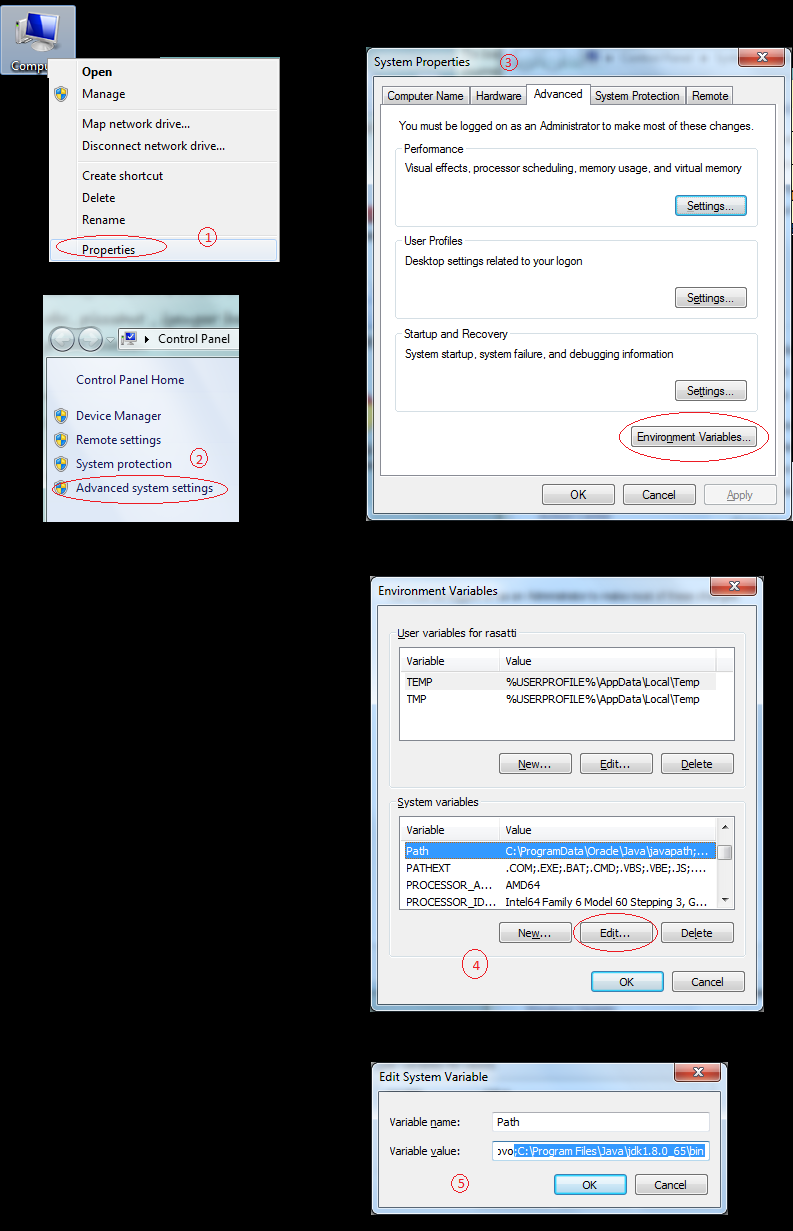
Here is example for setting PATH in windows 7.
Right click on Computer on Icon on desktop

Step 1) Click on Properties
Step 2) Click on Advaced System settings link
Step 3) In System Properties Window, click on Environment Variables.
Step 4) In Environment Variable Window, Select Path variable and click on Edit button
Step 5) In Edit System Variable Window, Add java bin location to 'Variable value'.
        Note: Please Note, This variable might already have some value in it. dont erase it,
        use semilcolon before adding  your location to it.
Step 6) once done, select ok on all window opened so far.

Now , you are set to run java, javac tools on your machine.
|